progeCAD Professional 2027 v27.0.6.11 – 2D & 3D CAD
progeCAD Professional 2027 v27.0.6.11 is a powerful 2D and 3D CAD design software developed by progeSOFT. Built on the IntelliCAD 14.1 engine, it provides a comprehensive environment for creating, editing, and managing technical drawings, engineering designs, architectural plans, and mechanical projects.
The software offers extensive compatibility with DWG and DXF file formats, making it a practical CAD solution for professionals who work with technical drawings and collaborate across different design platforms.
progeCAD Professional 2027 includes advanced drafting tools, 3D modeling capabilities, PDF-to-CAD conversion, raster image editing, BIM integration, and customizable automation features. It also introduces significant performance improvements, enhanced drawing comparison tools, floating drawing windows, and a more flexible licensing system.
Version 27.0.6.11 brings additional improvements to drafting, dimensions, printing, publishing, point clouds, external references, and overall application stability.
Designed for architects, mechanical engineers, civil engineers, designers, and CAD professionals, progeCAD Professional 2027 provides an efficient environment for everyday drafting and advanced design workflows.
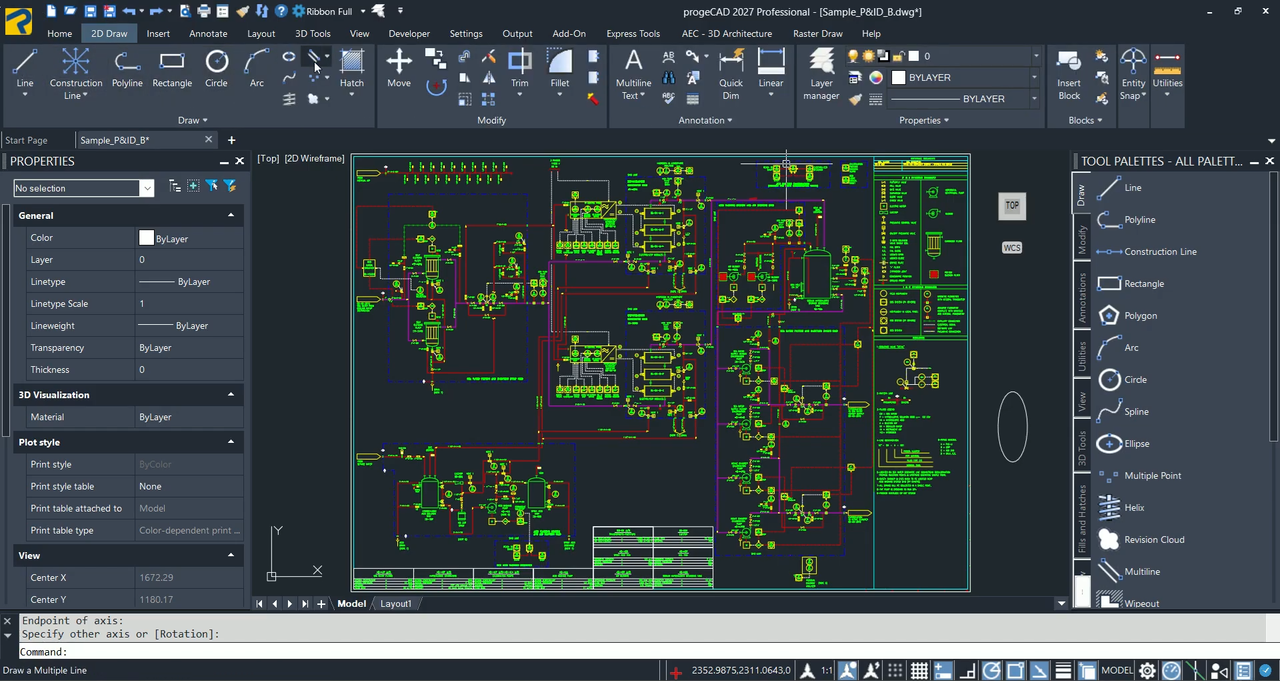
Features of ProgeCAD Professional 2027 v27.0.6.11
– 2D CAD Drafting: Create, edit, and manage detailed technical drawings using professional drafting and annotation tools.
– 3D Modeling: Build and modify 3D objects, surfaces, and solid models for engineering and architectural applications.
– DWG and DXF Compatibility: Open, edit, and save industry-standard DWG and DXF drawing files.
– IntelliCAD 14.1 Engine: Benefit from improved performance, faster object snapping, and optimized memory management.
– PDF to CAD Conversion: Convert PDF drawings into editable CAD entities with flexible import and batch-processing options.
– DWG Compare: Compare two drawing versions and quickly identify added, removed, and modified objects.
– Floating Drawing Windows: Move drawings into separate windows and work across multiple monitors.
– Advanced 2D Isometric Drafting: Create isometric technical drawings using standard 2D drafting tools.
– 3D Surface and Solid Tools: Create and modify 3D geometry using advanced modeling commands.
– Visual LISP Programming: Automate CAD tasks and develop custom applications using Visual LISP, AutoLISP, and supported programming tools.
– BIM Integration: Import Revit 2026 RVT and RFA files for improved architectural and engineering collaboration.
– GIS and Geospatial Tools: Work with geographic maps, coordinate systems, terrain data, and ESRI ArcGIS basemaps.
– Point Cloud Support: Import and work with point cloud data for surveying and engineering projects.
– Advanced Dimensioning: Edit dimensions and multileaders using improved grip-based editing tools.
– Raster Image Editing: Modify and clean raster images directly within the CAD environment.
– STEP and IGES Data Exchange: Import and export supported 3D engineering formats for interoperability.
– Customizable User Interface: Configure toolbars, menus, profiles, command aliases, and workspace settings.
– Flex Licensing: Move an active license between supported computers through online license transfer.
What’s New in progeCAD Professional 2027 v27.0.6.11?
The 2027 release introduces major improvements based on the IntelliCAD 14.1 engine, while update 27.0.6 includes additional performance enhancements, bug fixes, and stability improvements.
– Faster CAD Performance: Improved object snapping, drawing operations, layout switching, and memory management.
– Improved DWG Compare: Faster drawing comparison and more efficient revision checking.
– Enhanced Dimension Editing: Fixes and improvements for stretching dimensions, multileaders, and annotations.
– Printing and Publishing Improvements: Improved PDF publishing, print preview, page setup, and output file handling.
– Point Cloud Improvements: Faster LAS file loading, point cloud selection, and object snapping.
– Improved 3D Stability: Fixes for crashes and freezing related to point clouds and 3D positioning.
– Enhanced Text Editing: Better MTEXT handling, Unicode text support, and annotation performance.
– Programming Improvements: Optimized LISP and FAS/VLX execution and additional API fixes.
Applications of progeCAD Professional 2027
progeCAD Professional can be used in various engineering and design industries:
– Mechanical engineering and technical drafting.
– Architectural design and building documentation.
– Civil engineering and infrastructure projects.
– Electrical and mechanical layout design.
– 2D manufacturing drawings.
– 3D modeling and product design.
– Surveying and GIS applications.
– Construction and engineering documentation.
Why Choose progeCAD Professional 2027?
progeCAD Professional 2027 combines professional 2D drafting, 3D modeling, DWG compatibility, and advanced customization tools in one CAD environment. Its improved IntelliCAD engine delivers faster performance, while features such as DWG Compare, PDF conversion, Visual LISP, and BIM integration help streamline everyday design tasks.
It is a versatile CAD solution for engineers, architects, designers, and professionals looking for a comprehensive technical drawing and modeling platform.
If you want to download ProgeCAD Professional 2027 v27.0.6.11 full license, please click to DOWNLOAD button to download.

Inside package ProgeCAD Professional 2027 v27.0.6.11, already have cracked files and instruction how to install ProgeCAD Professional 2027 v27.0.6.11 step by step. I guarantee you can install ProgeCAD Professional 2027 v27.0.6.11 successfully if you follow that instruction.
If you also can’t install it or get any problems, please contact to me by email: [email protected], then I will help you to install software by teamviewer or Ultraviewer or Anydesk.
Thanks a lot

